On this page
- What IBO Player is, and its honest pros and cons
- Installing on Android phones, tablets and boxes
- Installing on Windows
- Installing on an Amazon Fire TV Stick
- Installing on macOS
- Installing on LG and Samsung televisions
- Adding your Tivitron playlist
- Fixing the Live TV layout
- Favourites, search and on-demand
- Settings worth knowing about
- When something goes wrong
What IBO Player is
IBO Player is an IPTV playback application built by a development group trading as IBODEV. It exists for almost every platform a British household is likely to own, which is precisely why we standardised on it. The interface is clean, playback is smooth and the feature set covers what people genuinely use.
Being straight about the trade-offs matters more than a sales pitch:
- Runs nearly everywhere (good). Android, Windows, macOS, Fire TV, LG webOS, Samsung Tizen and more. Non-Android televisions are usually the hardest devices to serve, and this is one of the few players that handles them properly.
- No recording (a drawback). There is no DVR function. If recording is essential to you, say so before ordering rather than after.
- No multi-screen (a drawback). One picture at a time, which dovetails with our one-device-per-subscription rule anyway.
- Remote playlist activation (unusual, not bad). Your credentials are entered on the IBO website rather than inside the app. The portal then pushes them down to the device. It feels odd the first time and is genuinely convenient afterwards, because changing a line never means fiddling with a remote control.
- A one-off licence (fair). IBODEV charges a small single payment per device. That goes to them, not to us, and it is not part of your Tivitron subscription.
Before you start, make sure your Tivitron welcome email is to hand. It contains the portal address, username, password, M3U link and XMLTV guide URL. If it has not arrived, look in the junk folder first, then message the support desk.
Installing on Android phones, tablets and boxes
The easiest platform of the lot, because you have a browser and a file manager to hand.
Step by step
- Open the IBO Player official website in the device browser and download the Android installation file.
- Android will warn you that the file comes from outside the Play Store. Choose Download anyway.
- Open the downloaded file and tap Install.
- Launch the app. An introductory screen explains the activation model — read it, then tap OK.
- The app is now ready. Jump to adding your playlist.
Installing on Windows
Windows 10 and 11 only, and the installer is 64-bit.
Step by step
- Download the Windows installer from the IBO Player website.
- Windows SmartScreen will interrupt because the file was not fetched from the Microsoft Store. Click More info.
- Click Run anyway to continue.
- Work through the installer: Next, optionally tick the desktop shortcut, Next again, then Install.
- Click Finish to open IBO Player.
Installing on an Amazon Fire TV Stick
The Fire TV Stick is the most common device our London subscribers use, so it gets the fullest treatment. Because the app is not in Amazon's store, you install a side-loading tool called Downloader first. A dedicated page with every screenshot lives at our Fire TV Stick walkthrough; the condensed version follows.
1. Find the Downloader tool
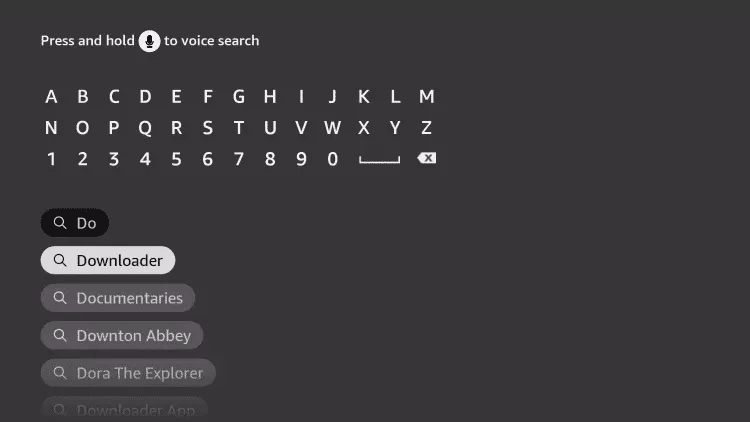
From the Fire TV home screen, move to the magnifier icon and open the search field. Type D and the first suggestion should be Downloader.
2. Install it
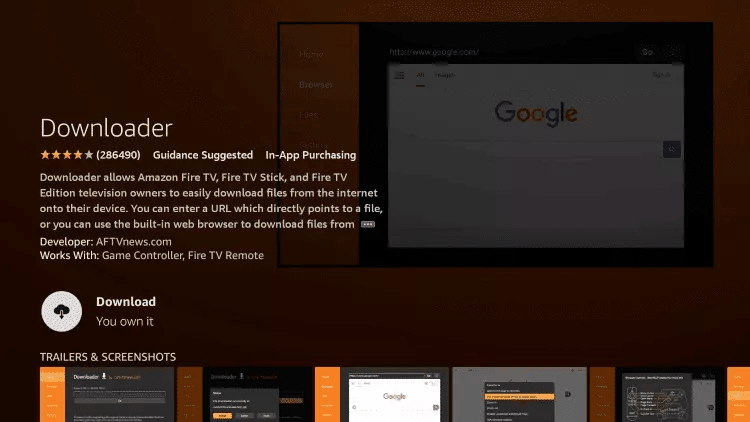
Select the app and choose Download. When prompted to grant media access, choose Allow.
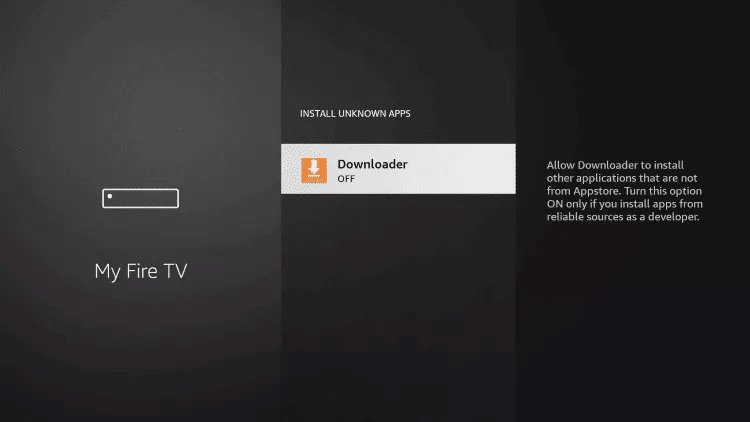
3. Allow installation from outside the store
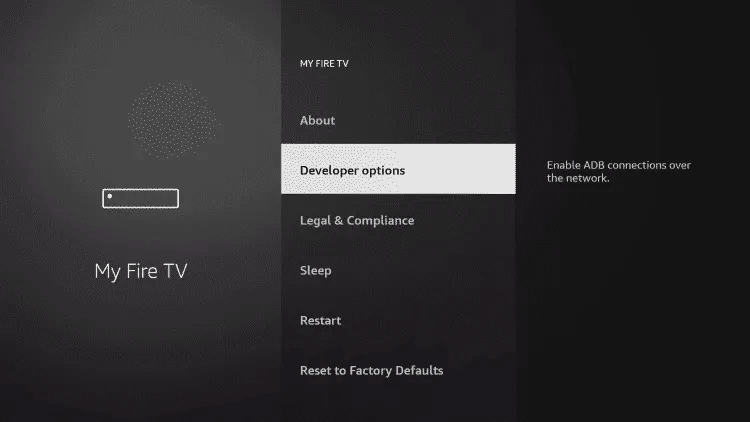
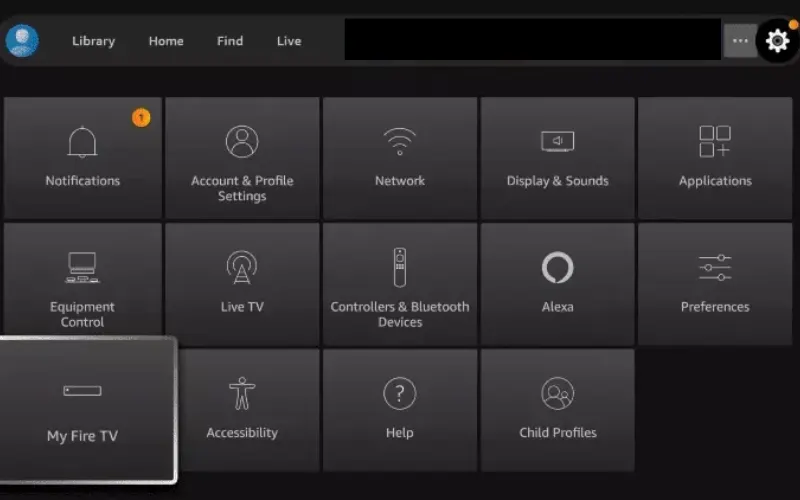
Open Settings › My Fire TV › Developer options. If Developer options is not visible, highlight About and press the remote's select button seven times to reveal it.
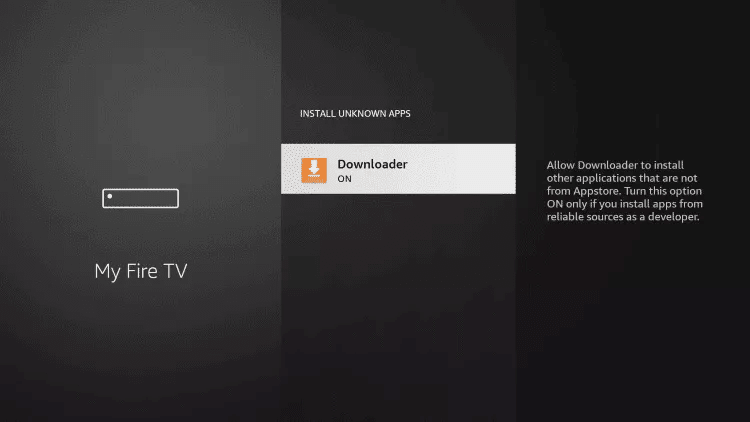
4. Switch the permission on
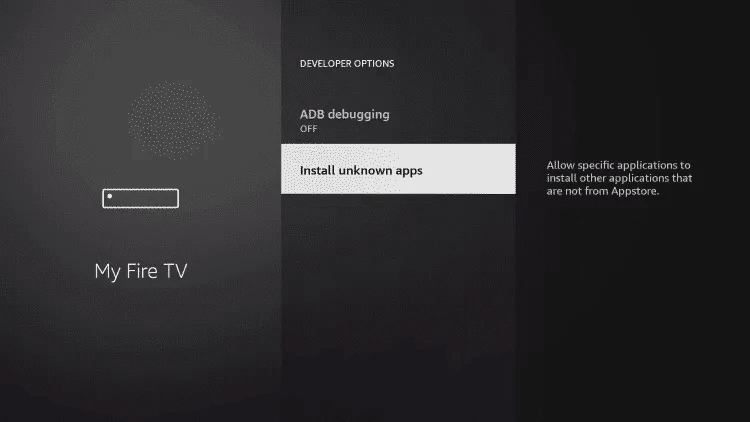
Select Downloader in the list. The toggle reads OFF; press select so it reads ON.
5. Fetch and install IBO Player
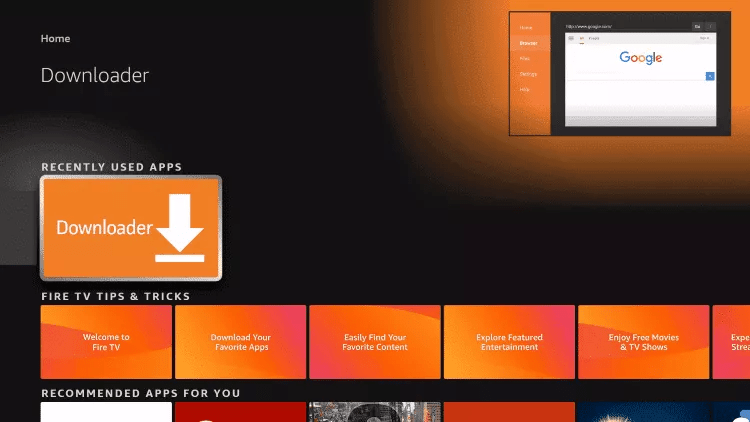
Open Downloader from the home row, select the address field above the Go button and enter the official Downloader code for the IBO Player Android build: 511693. Press Go, let the file download without touching anything, then work through the installer prompts. Choose OK on the welcome message and the app is ready.
Installing on macOS
Step by step
- Download the macOS build from the IBO Player download section.
- Open the file and drag the icon into your Applications folder. Installation takes a few seconds.
- Open Launchpad and click the icon. macOS will refuse the first launch because the app came from outside the App Store.
- Click the Apple menu, choose System Settings, scroll to Privacy & Security and find the blocked application near the bottom. Click Open Anyway, then confirm.
- That choice is permanent; subsequent launches open straight away.
Installing on LG and Samsung televisions
Non-Android televisions are where most services fall over, and where IBO Player earns its keep. The example below uses LG webOS; Samsung Tizen and Toshiba follow the same shape. Our Smart TV page has the full version.
Step by step
- Open the LG Content Store (Samsung owners: the Samsung Apps store).
- Click the magnifier icon in the top-right corner.
- Search for IBO Player.
- Pick the correct result. Several similarly named apps exist — you want the one called simply "Ibo Player".
- Choose Install, then Launch.
- A welcome message appears on first run. Continue to the playlist section below.
Adding your Tivitron playlist
This is the step that catches people out, so read it slowly. IBO Player uses remote playlist activation: your credentials are typed into the IBO website, not into the app on your telly. The portal then pushes them down to the device automatically.
1. Get your device details
Open IBO Player on the streaming device and select the person icon on the main dashboard. The Device Info panel in the top-left shows a MAC address and a device key. Write both down.
2. Log in to the portal
On a phone or computer, open the IBO Player website and choose Manage Playlist from the top menu. Enter the MAC address and device key, then log in.
3a. Add an M3U line
If your Tivitron email gave you a single long streaming URL, this is the route.
- Playlist name — anything you like. "Tivitron" does the job.
- Playlist URL — paste the M3U link exactly as supplied, with no trailing spaces.
- XMLTV EPG URL — optional. Leave it blank and IBO Player reads the guide from the playlist itself. Paste the XMLTV link from your email if you prefer the fuller fourteen-day data.
- Protect this playlist — tick it to add a PIN, which is worth doing on a family television.
Click Save.
3b. Add an Xtream Codes line
If your email supplied a host, username and password separately, choose Add XC Playlist instead. The fields are the same as above with one addition: Host, which is the server address from your welcome email.
4. Reload
Go back to the television and restart IBO Player. Channel groups and the on-demand shelf appear within a few seconds. If they do not, close the app fully and reopen it once more.
Fixing the Live TV layout
Out of the box, the Live TV screen is set to a style that crowds channel names under the preview window and squashes the guide. It looks broken; it is simply a poor default.
The two-second fix
- From the IBO Player dashboard, click the screen icon next to the Wi-Fi symbol.
- You are now in Live Screen Style. The default is the cramped one.
- Switch to the alternative style and click Save.
- Channel names now have room, the preview window sits correctly and the programme guide lines up. Categories are hidden by default — press left on the remote (or the back gesture on a touch device) to bring them back.
Favourites, search and on-demand
- Add a favourite: from the channel list, press and hold on a channel, then choose Add. A heart appears beside the name and the channel joins the Favourites folder at the top of the category column.
- Search live channels: use the search field at the top of the Live TV section. Typing three or four letters is usually enough.
- Films and series: these sit in their own sections with posters, synopses and cast information. Series are numbered by season and episode, so a box set plays in order rather than at random.
Settings worth knowing about
| Setting | What it does |
|---|---|
| Network | Shows the current connection and lets you confirm the device is on the route you expect — useful when diagnosing a stutter. |
| Parental control | PIN-locks categories. Pair it with the children's group and the adult film group in one go. |
| Check for updates | Pulls the newest build. Worth running if playback behaviour changes suddenly. |
| Manage categories | Hide groups you never watch. Most UK households hide two-thirds of the international folders and the list becomes far easier to live with. |
| Live TV player / VOD player | Switches the decoder. If one specific channel misbehaves while everything else is fine, changing this often fixes it. |
| Clear cache | The first thing to try when posters fail to load or the guide looks stale. |
| Auto boot on start | Launches IBO Player as soon as the device powers on. Handy on a box that only ever does this one job. |
When something goes wrong
- Nothing appears after saving the playlist. Close IBO Player completely and reopen it. If it is still empty, check the MAC address on the portal matches the device you are actually holding — people frequently register one box and then use another.
- Picture stutters. Move to a cable or nearer the router before changing anything in the app. Wireless is behind the overwhelming majority of these reports.
- One channel fails, the rest are fine. Try switching the Live TV player decoder in Settings. If it persists, message us the channel name and we will repoint the feed.
- The guide is blank on some channels. Smaller international broadcasters do not publish data we can ingest. The main UK groups always carry fourteen days.
- Still stuck? The FAQ covers the common ground, and the support desk is staffed around the clock.
Not a subscriber yet? Everything above works the moment a line is issued. The £6.99 introductory month is the cheapest way to test the whole setup on your own kit.